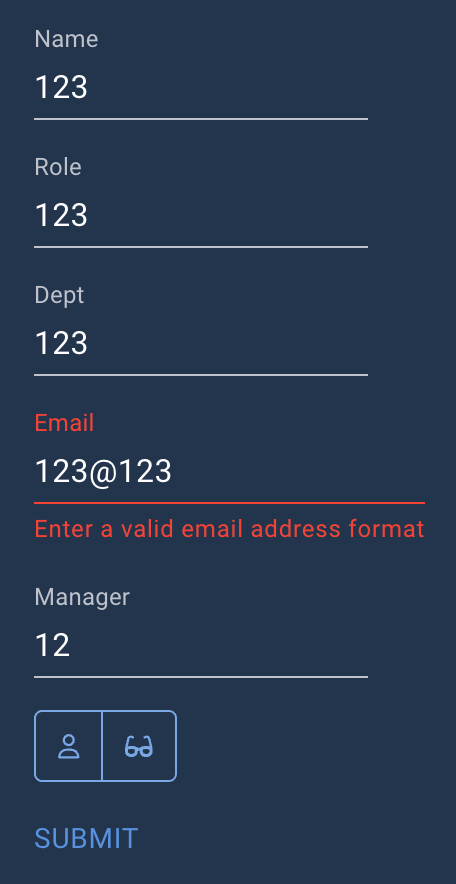
I’m trying to find the best way to combine individual input field, mostly text, validation so they match a specific pattern and the form level validation so the submit button is not available until all fields pass validation and have the error message appear on each field individually.
I tried to use (Get-Element -Id ‘fieldid’).Valid but this doesn’t get updated on the form until you start editing the next field. Is the validation result available in $EventData.field somehow?
Is anyone else doing this and how have you solved it?
You don’t need to use Get-Element. Everything is already available in the components themselves.
Below is an example of how you can use validation. I’ve added a few textboxes and a togglegroup in a new-udform.
Clicking on the toggle will show you what’s inside of $EventData anytime validation runs (like when you write something in the textbox):
New-UDApp -Content {

    New-UDDynamic -Id "MyDynamicData" -Content {

        New-UDForm -Children {


            ## This data is will be in the EventData. Make sure to put in -ID for easier management
            New-UDTextbox -Label "Name" -Id "MyName"
            New-UDTextbox -Label "Role" -Id "MyRole"
            New-UDTextbox -Label "Dept" -Id "MyDept"


            ## This one controls the modal, so you don't get spammed each time you type something. You can enable any of these to see what information
            ## is located in the $EventData.
            New-UDToggleButtonGroup -Content {
                New-UDToggleButton -Content {
                    New-UDIcon -Icon 'User'
                }

                New-UDToggleButton -Content {
                    New-UDIcon -Icon 'glasses'
                } -Id 'test'

            } -OnChange {
                $Session:Toggle = $EventData
                Show-UDToast -Message "You selected $EventData"
            } -Id "ToggleGroup"


        } -OnSubmit {

            Show-UDSnackbar -Message "Form completed" -Persist


        } -OnValidate {

            ## This toggles the modal, so you don't get spammed, since validation runs often
            If ($Session:Toggle) {

                Show-UDModal -Content {

                    New-UDMarkdown -markdown ("**MyName:** {0} `n **MyRole:** {1} `n **MyDepartment:** {2} `n **EventData:** {3}" -f $EventData.MyName,$EventData.MyRole, $EventData.Role, $($EventData | Out-String))

                }

            }

            ## EventData contains the IDs from your objects. You will notice that the textboxs ID's are available while the toggle is not.
            ## To use the Toggle, we can put it in a $Session scope to be used in our validation.

            ## Here we validate the textboxes to make sure they are not empty
            If ([string]::IsNullOrWhiteSpace($EventData.MyName)) {New-UDValidationResult -ValidationError "Name Cannot be empty"}
            If ([string]::IsNullOrWhiteSpace($EventData.MyRole)) {New-UDValidationResult -ValidationError "Role Cannot be empty"}
            If ([string]::IsNullOrWhiteSpace($EventData.MyDept)) {New-UDValidationResult -ValidationError "Dept Cannot be empty"}

            # If New-UDvalidationResult -valid is not active, then your submit button is disabled. So your logic always has to finish validation on this one.
            # You can try putting a # in front of the New-UDvalidation -Valid below. You can now not complete the form.
            New-UDValidationResult -Valid

        }
    }
}
You can also check this question where an New-UDstepper is used:
Thank you for the response, but this unfortunately doesn’t achieve what I’m looking for.
This is only doing the validation at the form level and not the individual fields, I want to do both. I need the individual fields to show error like in the screenshot, but want the submit button only enabled once all fields pass their individual validation rules.
You can, but then you need to keep control of the state of that specific field. It will quickly end up messy depending on how large your form is.
In a form, validation will only trigger for the fields that do NOT have their own validation paramter. So in this example, the first 3 fields will trigger the validation on the form,
but email will not. So you need to have at least 1 component that uses the validation from your form at the end to allow validation to succeed. Otherwise it breaks the natural flow that people will have when filling out your form.
New-UDApp -Content {

    New-UDDynamic -Id "MyDynamicData" -Content {

        New-UDForm -Children {


            ## This data is will be in the EventData. Make sure to put in -ID for easier management
            New-UDTextbox -Label "Name" -Id "MyName"
            New-UDTextbox -Label "Role" -Id "MyRole"
            New-UDTextbox -Label "Dept" -Id "MyDept"
            New-UDTextbox -Label "Email" -Id 'MyMail' -OnValidate {

                $pattern = '^[^@\s]+@[^@\s]+\.[^@\s]+$'
                If ($EventData -match $pattern) {

                    New-UDValidationResult -Valid
                    $Session:MyMailState = "valid"


                } else {

                    New-UDValidationResult -ValidationError "Enter a valid email address format"

                }
            }
            New-UDTextbox -Label "Manager" -Id "MyManager"


            ## This one controls the modal, so you don't get spammed each time you type something. You can enable any of these to see what information
            ## is located in the $EventData.
            New-UDToggleButtonGroup -Content {
                New-UDToggleButton -Content {
                    New-UDIcon -Icon 'User'
                }

                New-UDToggleButton -Content {
                    New-UDIcon -Icon 'glasses'
                } -Id 'test'

            } -OnChange {
                $Session:Toggle = $EventData
                Show-UDToast -Message "You selected $EventData"
            } -Id "ToggleGroup"


        } -OnSubmit {

            Show-UDSnackbar -Message "Form completed" -Persist


        } -OnValidate {

            ## This toggles the modal, so you don't get spammed, since validation runs often
            If ($Session:Toggle) {

                Show-UDModal -Content {

                    New-UDMarkdown -markdown ("**MyName:** {0} `n **MyRole:** {1} `n **MyDepartment:** {2} `n **EventData:** {3} `n **SessionState:** {4}" -f $EventData.MyName,$EventData.MyRole, $EventData.Role, $($EventData | Out-String), $Session:MyMailState)

                }

            }

            ## EventData contains the IDs from your objects. You will notice that the textboxs ID's are available while the toggle is not.
            ## To use the Toggle, we can put it in a $Session scope to be used in our validation.


            ## Here we validate the textboxes to make sure they are not empty
            If ([string]::IsNullOrWhiteSpace($EventData.MyName)) {New-UDValidationResult -ValidationError "Name Cannot be empty"}
            elseIf ([string]::IsNullOrWhiteSpace($EventData.MyRole)) {New-UDValidationResult -ValidationError "Role Cannot be empty"}
            elseIf ([string]::IsNullOrWhiteSpace($EventData.MyDept)) {New-UDValidationResult -ValidationError "Dept Cannot be empty"}
            elseif ($Session:MyMailState -ne 'valid') {
                # we dont want to do anything since validation happens on the component itself.
            }
            elseif ([string]::IsNullOrWhiteSpace($EventData.MyManager)){

                New-UDValidationResult -ValidationError "Manager Cannot be empty"

            } else {
                New-UDValidationResult -Valid
            }

            New-UDValidationResult -ValidationError "One of more of your fields are not filled out correctly"

            # If New-UDvalidationResult -valid is not active, then your submit button is disabled. So your logic always has to finish validation on this one.
            # You can try putting a # in front of the New-UDvalidation -Valid below. You can now not complete the form.
            #New-UDValidationResult -Valid

        }
    }

}
You can get rid of udform entirely and validate each element, as well as the submit button, individually. That’s what I’ve done. It requires more coding and can sometimes get complicated, but it gives you much more control over the process.
For example, my submit button changes its color and text depending on the status of individual fields in the app. I can control its behavior, display notifications the way I want when it’s pressed, and even place the button wherever I want (outside of udcard, for instance).
When combined with dynamic styling of individual elements—such as when a field is empty, in the wrong format, or required—it creates pretty good results.
This is exactly what I have done as well. I wanted so much more control on layout of the form. It does require manually checking the fields and prompting the user for invalid entries.